Minimal ZIP file – part I
This article is part of a series.
- Creating a valid ZIP-file 👈
- Use .NET’s
DeflateStream - No dependencies (coding the DEFLATE algorithm)
- Calculating the CRC-32
Introduction
How difficult is it to create a ZIP-file1 with a bare minimum2 - but readable - amount of code?
To go slowly, we do this in a few steps. Each in their own article. The first step is to create a valid, but not very optimal ZIP-file (i.e., uncompressed).
The code is in C# but should be easy to follow for people with knowledge of other languages. No exotic syntax or tricks are used. If something is unclear or can be done better, let me know.
File format
For a little background, these are the parts of a ZIP-file with two files:
The individual parts contain things like file names, file sizes, checksums and compressed data.
Source code
The main code is only a few lines and follows the said file layout.
// Zip datavar filename = "bananas.txt"u8.ToArray();var data = "BANANABANANABANANABANANABANANA"u8.ToArray();...// Create ZIPusing var zip = File.Create("minimal.zip");...// Calculate CRC-32/ISO-HDLC over the uncompressed datavar crc32 = Crc32.HashToUInt32(filedata);// Write filevar offset = WriteLocalFileHeader();WriteData();// Write directoryvar info = WriteCentralDirectoryHeader(offset);WriteEndOfCentralDirectoryRecord(info.Position, info.Size);
In fact, that is most of it. The called functions only contain writing numbers, strings and data to a file.
The entire source code is 100 lines. Readability is the main goal.
As said, this is a valid ZIP-file with no compression. So it actually inflates your data because of the headers.
The full code can be found in Zip1.cs.
The proof is in the pudding
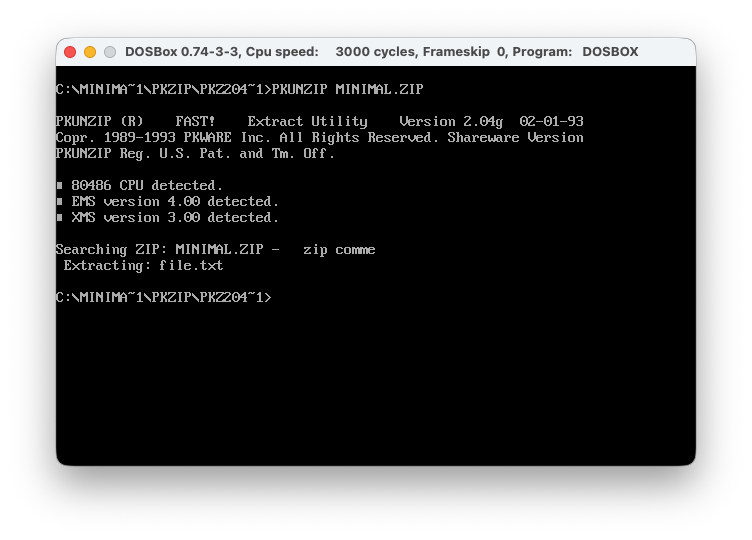
PKZIP 2.04g (Jan ‘93) confirms that it is a valid ZIP-file.
Info-ZIP’s zip agrees:
dotnet runzip -T minimal.zip
test of minimal.zip OK
Info-ZIP’s zipinfo is also a great tool to inspect ZIP-files.
zipinfo -v minimal.zip
Next up
In the next part we’ll cheat a little and use .NET’s DeflateStream to
create a more useful ZIP-file.
-
Wikipedia: ZIP (file format) ↩︎
-
The title of this article is about the code, not about the size of the created ZIP-file. Good find, Bertrik Sikken! ↩︎